이번 게시글에서는 생성 패턴 중 하나인 프로토 타입 패턴에 대해서 이야기해보려고 합니다.
아래와 같은 문제 상황이 있다고 가정하여, 이를 해결하고자 할 때 해결책에 대한 방안을 고려해 보도록 하겠습니다.
문제 상황
이미 생성되어 있는 복잡한 구조의 오브젝트를 기준으로, 정확한 복사본을 만들어야 하는 상황이 발생하였습니다. 그렇다면 다음과 같이 복사를 진행하게 될 것입니다. 먼저 같은 클래스의 새 객체를 생성하고, 원본 객체의 모든 필드(오브젝트의 복잡한 구조)를 새 객체에 복사해야 합니다. 하지만, 객체의 일부 필드들이 private, 직렬화 되지않을 때 복사하기 어려움이 생기게 됩니다.
해결책
실제 복제가 진행되는 객체들에게 복제 프로세스를 위임합니다. 이 말은 특정 객체 A를 사용하는 클래스 B가 있다고 가정을 해보겠습니다. B클래스가 A의 객체를 복사하고 싶을 때 B클래스 내에서 A클래스를 복제하는 것이 아닌, A클래스 자체적으로 복제 프로세스를 적용하여, 정확한 복사본을 얻는 방식입니다. 아래 이미지를 통해 자세히 이해해 보겠습니다.
위와 같은 경우, 오브젝트의 private Field와 직렬화되지 않는 내부객체(별도의 Class)의 필드는 외부에서 복사하기 어려워집니다. 아래와 같은 복사를 진행한 후 정확한 복사(DeepCopy)를 진행할 때 각 Field에 접근할 수없습니다. 따라서 아래와 같은 이미지로 구조가 변경이 되어야 합니다.
EX) GameObject.Instantiate / Object.MemberwiseClone();

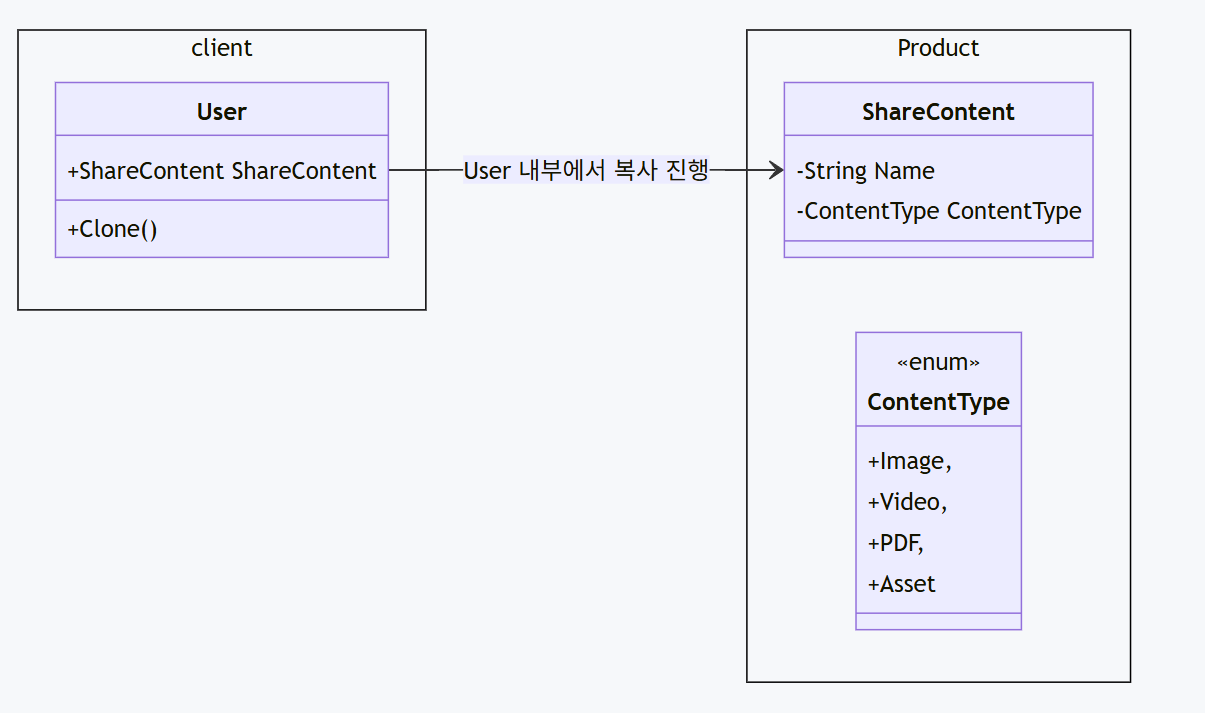
실제 프로토 타입 패턴의 클래스 다이어 그램을 그려보자면 아래와 같습니다.

각 콘텐츠에 따라, 오브젝트를 복사하고 싶을 때 내부 메서드를 통해 Clone, DeepCopy를 진행합니다. 이때 유니티에서 제공하는 ICloable은 Private Field 즉 직렬화되지 않는 필드는 복사되지 않아, DeepCopy에서 별도로 구현이 필요합니다.
클래스 정의
Namespace Product
public class ShareContent : MonoBehaviour, ICloneable
{
    public ShareContentInfo Info = new ShareContentInfo();
    public List<int> Datas = new List<int>();

    public virtual object Clone()
    {
        ShareContent content = (ShareContent)this.MemberwiseClone();
        return Instantiate(content);
    }
    public void SetContentType(ContentType type)
    {
        Info.Type = type;
    }

    public virtual object DeepCopy()
    {
        ShareContent content = Instantiate(this);
        // 비 직렬화 필드 데이터 인풋
        content.Info = this.Info;
        content.Datas = this.Datas;
        return content;
    }
    public void Print()
    {
        Debug.Log(this.gameObject.name + $": Name - {Info.Name}, Type - {Info.Type.ToString()}, Url - {Info.Url}");
    }
    public void SetName(string name)
    {
        Info.Name = name;
    }
    public void SetData(ContentType type, string name, string url, List<int> data)
    {
        Info.Type = type;
        Info.Name = name;
        Info.Url = url;
        Datas = data;
    }
}

public class ShareContentInfo
{
    public ContentType Type;
    public string Name;
    public string Url;
}

public enum ContentType
{
    Image,
    Video,
    PDF,
    Asset,
}
각 ContentType에 맞는 오브젝트를 전체 상속하는 ShareContent에서, Clone, DeepCopy를 진행하고, 이를 virtual로 선언하여, 상속받은 클래스에서 재정의할 수 있게 구조를 설계하였고, 기존 Clone의 경우에는 비직렬화 필드는 복사되지 않기 때문에 DeepCopy를 통해 새롭게 데이터를 넣어주는 구조를 따르게 됩니다.
Namespace Client
public VideoContent VideoContent;
public ImageContent ImageContent;
public PDFContent PDFContent;
// Start is called once before the first execution of Update after the MonoBehaviour is created
void Start()
{
    VideoContent video = Instantiate(VideoContent);
    video.SetData(ContentType.Video, "Video", "TEST", null);
    video.name = "origin";
    ShareContent copy = CloneObject(video);
    copy.name = "CloneCopy";
    ShareContent deepCopy = DeepCopyObject(video);
    deepCopy.name = "DeepCopy";
    video.Print();
    copy.Print();
    deepCopy.Print();
}
private ShareContent DeepCopyObject(ShareContent content)
{
    ShareContent deepCopy = (ShareContent) content.DeepCopy();
    return deepCopy;
}
private ShareContent CloneObject(ShareContent content)
{
    ShareContent clone = (ShareContent) content.Clone();
    return clone;
}
복사할 오브젝트를 생성하고, 이를 복사할 때 직접 하는 것이 아닌, 복사가 되는 대상에게 복사를 요청하여, 스스로 복제할 수 있게 구성하고, 복사가 끝난 뒤 정상적으로 복사가 되었는지 확인하기 위해 Print를 통해 복사합니다.
출력 결과

일반 Clone의 경우 Private Field(비직렬화 필드)는 복사하지 못하고, DeepCopy를 통해 데이터를 복사하여 넣어줄 때만 정상적으로 데이터가 들어가는 모습을 볼 수 있습니다.
패턴 패키지
'Unity' 카테고리의 다른 글
| [디자인 패턴] 구조 패턴 - 어댑터 패턴 (0) | 2025.12.01 |
|---|---|
| [디자인 패턴] 생성 패턴 - 빌더 (0) | 2025.10.14 |
| [디자인 패턴] 생성 패턴 - 추상 팩토리 (0) | 2025.10.13 |
| [디자인 패턴] 생성 패턴 - 팩토리 메서드 (0) | 2025.10.11 |
| ScriptableObject - 2 (0) | 2025.10.10 |